Many seniors would love to train their memory but aren’t comfortable using a smartphone. All they need is a little help ordering, installing and activating the Brainmondo® app. You earn a reward for everyone you help.
It all takes about fifteen minutes. The senior leaves with a working app, and you with a good feeling and a reward.
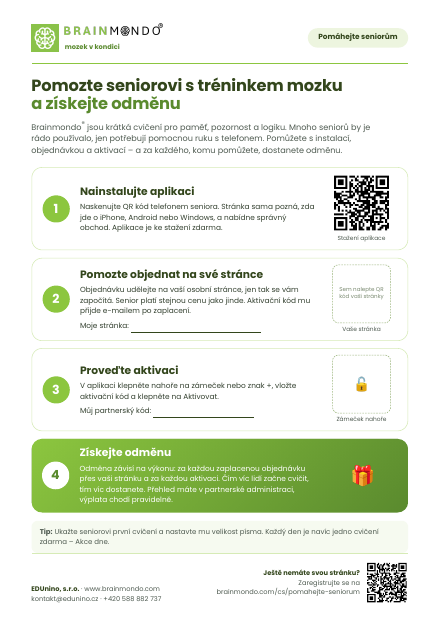
Scan the QR code on the leaflet with the senior’s phone. The page recognizes the type of phone and opens the right app store. The download is free.
Place the order on your personal page – only then is it credited to you. The older person pays the same price as anywhere else. The activation code arrives by email after payment.
In the app, tap the padlock or the + sign at the top, enter the activation code and tap Activate.
Your reward depends on results: for every paid order through your page and for every activation. You can see every item in the partner administration, and payouts arrive regularly.
Help your grandparents and their friends. One afternoon is often enough for a whole group.
Offer your help in your apartment building, your town, a senior center or the library.
You can offer memory training to your clients as part of their care.
When setting up a new phone, offer a brain-training app as well.
Print the leaflet and keep it handy. Add the address of your page and your partner code, or stick on your page’s QR code.
Leave the leaflet for seniors with them after installation: it shows the app icon, eight exercises with their codes, tips and who to contact for help.
No. The price on your page is the same as on our website, and we pay your reward. If you actively promote the app and we agree on that kind of partnership, the price for your customers can even be lower than on our website.
The reward is made up of an amount for each paid order and for each activation. We’ll tell you the exact amount when you sign up; it depends on the country and the type of license.
You will find your seven-character partner code right in the Brainmondo app: download it, open it and in Settings choose Help with installation. We will set up your own order page and access to the partner administration, where you can see orders, activations and rewards – just write to us.
We pay rewards regularly, usually once a month, once they reach the minimum amount. You get a PDF statement with every payout, and you can also find all the details – individual orders, activations and rewards – in the partner administration.
That’s what you’re there for. When ordering, you can enter the email address of someone in their family, or have the invoice sent to your partner email address. Then help the older person with installation and activation, and hand them a printed copy of the invoice in their name.
Write to us at [email protected] or call +420 588 882 737. We’ll prepare your page, code and leaflet.
I want to helpDownload Brainmondo® and try it for as long as you like.
It works on all currently supported systems
– iPhone and iPad, Android and Windows.

Your system is your system
Download for your system nowWe couldn’t detect your system – please choose one of the three platforms below.
Scan the QR code with your phone or click your store's button.